For a long time, Chinese motherboards have been deemed to have certain quirks compared to well-known brands. And I have avoided them for anything critical that needs to work reliably.
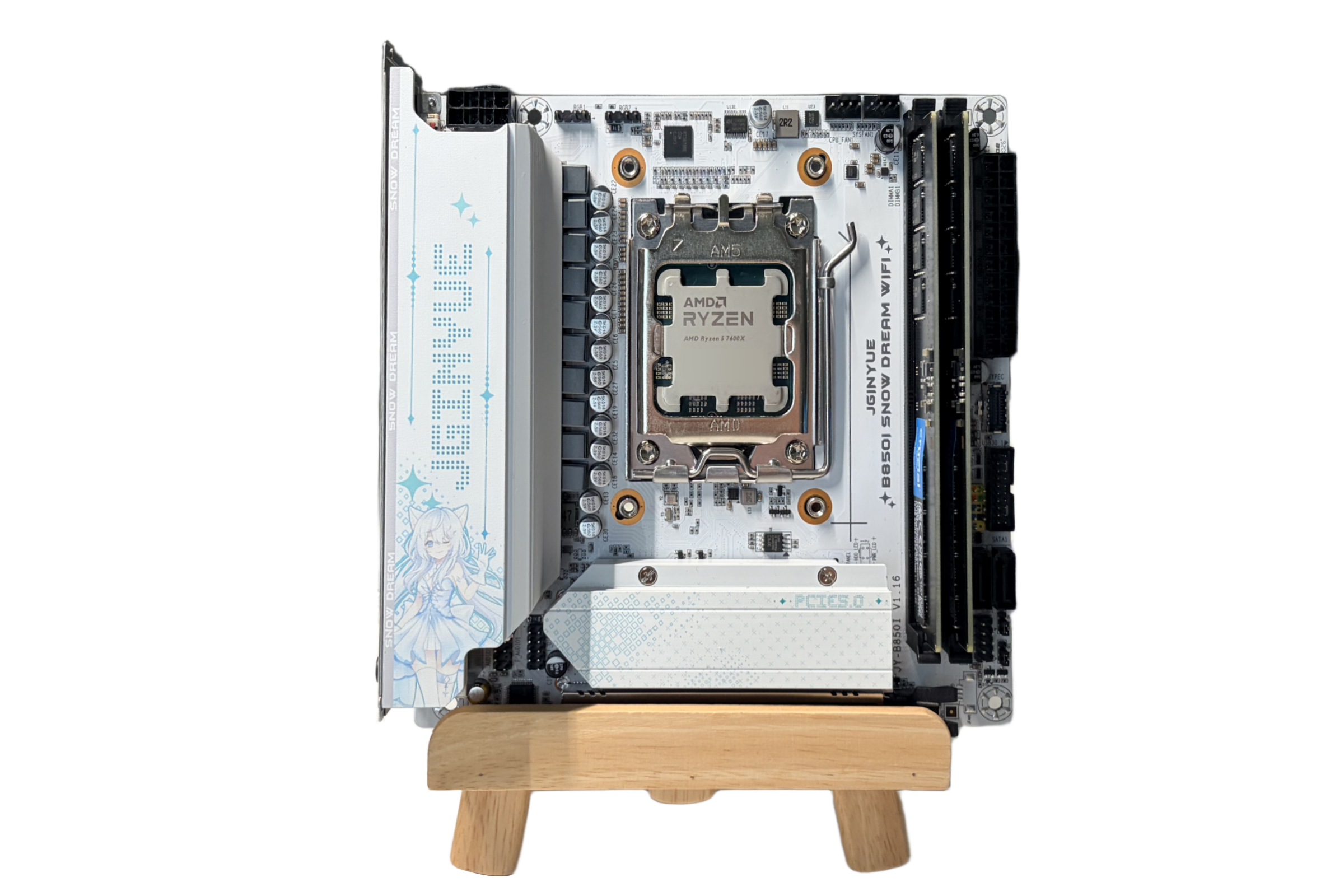
Recently, I needed a small computer where I could mess around without interrupting my primary setups. After some browsing on AliExpress, I set my eyes on this JGINYUE B850i Snow Dream motherboard and placed an order for $145.
JGINYUE is a motherboard manufacturer that primarily targets Chinese markets.
It arrived in about 2 weeks. China Post ePacket is much faster these days compared to COVID days.
Installation
Installation of this motherboard is fairly standard. It isn't too different compared to a normal motherboard. Since this is a B850 motherboard, it comes with Ryzen 9000 support by default.
Board Specifications
Here are the board's official specifications, per JGINYUE's website.
| Item | Detail |
|---|---|
| Form Factor | Mini-ITX |
| Chipset | AMD B850 |
| CPU | AMD Ryzen 7000 / 8000 / 9000 series |
| Memory | 2x DDR5, dual channel, 4800~8000+ (OC) MT/s, up to 96GB |
| Expansion | 1x PCIe 5.0 x16, 1x OCuLink (PCH PCIe 3.0 x4) |
| Storage | 1x M.2 PCIe 5.0 x4 (Front), 2x M.2 PCIe 4.0 x4 (Back), 2x SATA 3.0 |
| Onboard Video | 1x HDMI, 1x DisplayPort |
| LAN | 2.5GbE (Realtek 8125BG) |
| Wi-Fi | MediaTek MT7902 (Wi-Fi 6E) |
| Audio | Realtek ALC897 |
| USB (Rear) | 4x USB 2.0, 3x USB 3.2, 1x USB-C |
| USB (Front) | 4x USB 2.0, 2x USB 3.2 Gen1, 1x USB-C |
| Power | 24-pin ATX + 8-pin EPS, 8+2+1 phase DrMOS |
| Fan Headers | 2x 4-pin PWM |
| RGB | 2x 3-pin ARGB |
Test Specifications
| Component | Model |
|---|---|
| CPU | AMD Ryzen 5 7600X |
| Memory | Crucial DDR5-4800 (16GB x 2) |
| Storage | Silicon Power A60 256GB SSD |
| GPU | Intel Arc B580 |
| Power Supply | Thermalright TGFX-850W SFX |
Unfortunately, I am not rich enough to afford the fastest RAM and SSD in this AI apocalypse.
The Good
1. Appearance
Being a Waifu motherboard, this motherboard looks incredibly cute!
It comes with a full VRM heat sink and an integrated I/O shield. The entire design feels premium.
2. Hardware Compatibility
Historically, Chinese ITX motherboards can have some issues with installing niche hardware. At least until now, I haven't experienced any issues with it not fitting.
It also works nicely with Intel Arc since it has the option to enable Resizable BAR.
3. 3 SSD Slots
This motherboard comes with 3 SSD slots, with 1 on the front and 2 on the back. This puts it on par with most B650 ATX boards and is plenty on ITX motherboards.
The one on the front is PCIe 5.0x4 and the two on the back are PCIe 4.0x4. All of them only accept 2280 M.2 SSDs.
4. OCuLink
This came as a surprise and I only realised it when it arrived. This can be handy when I want to test other PCIe devices without tearing down the entire PC.
The OCuLink is PCIe 3.0x4 so I don't think it is very good for external graphics cards. It is handy for me but I am not sure what it is designed for.
5. IOMMU
This motherboard has correct IOMMU grouping.
PCIe devices are grouped into their own IOMMU group alongside their parent port.
The Bad
1. UEFI
The UEFI configuration is still somewhat confusing compared to major brands like ASUS or ASRock.
After 15 minutes in the BIOS, I did not find the option to set USB Standby to ON so I can use it to charge my mouse when it is powered off.
The fan curve is somewhat less than obvious about what speed a fan reaches at a certain temperature. I would prefer it let users enter the fan speed percentage directly at a certain temperature.
The UEFI interface cannot be controlled with a mouse but this is not an issue for me.
In addition, there is still no BIOS Flash Back or Instant Flash and you have to flash it with a bootable USB drive.
2. No DC Fan Control
Like most Chinese motherboards, this one does not let you control water pump speed. Some AIO pumps will have an audible whine when running at 100% and usually I can set it to 80% to run it completely silent. But I cannot adjust the AIO pump speed with this motherboard.
3. HDMI Dummy Plug Required for Headless
I was using this motherboard to test some PCIe cards so I unplugged the graphics card and thought I could just SSH into it. However, the motherboard refused to boot without a display. I have to use an HDMI dummy plug to boot the computer.
4. RGB Software
This might not be a downside since JGINYUE supports OpenRGB natively. However, with it being the only option at the moment, it does carry a very steep learning curve for beginners and can be awkward to use compared to Aura Sync. I am not using it in a tempered glass case so I turned off RGB for this build.
5. ASPM
Unfortunately, this motherboard contains a PCIe bridge that is marked as "ASPM not supported".
00:02.1 PCI bridge: Advanced Micro Devices, Inc. [AMD] Raphael/Granite Ridge GPP Bridge (prog-if 00 [Normal decode])
Subsystem: Advanced Micro Devices, Inc. [AMD] Device 1453
IOMMU group: 2
Bus: primary=00, secondary=01, subordinate=07, sec-latency=0
...
LnkCap: Port #1, Speed 32GT/s, Width x4, ASPM not supported
ClockPM- Surprise- LLActRep+ BwNot+ ASPMOptComp+
LnkCtl: ASPM Disabled; RCB 64 bytes, LnkDisable- CommClk-
ExtSynch- ClockPM- AutWidDis- BWInt+ AutBWInt+ FltModeDis-
LnkSta: Speed 16GT/s, Width x4
TrErr- Train- SlotClk+ DLActive+ BWMgmt- ABWMgmt-
...
Even without ASPM, with the graphics card removed, my testing setup runs at about 27W at idle.
Recommended Use Case
I would recommend this motherboard to:
- Anime Fans
- It's so cute!
- Mid-range ITX build
- Pair with RTX 5060 / 5070 (Ti) / RX 9070 (XT) / 9060 (XT) / B580
- Gaming or Backup Setup
I wouldn't recommend using this motherboard in:
- Low- or high-end ITX build
- If you are a low-end user, you should use LGA 1700 or AM4 paired with DDR4.
- If you are a high-end user, I don't think you would buy a JGINYUE motherboard.
- Productivity
- Intel Core Ultra 265K / 270K+ is cheaper with more cores and QuickSync.
Conclusion
Although it isn't as polished as my ASRock Steel Legend B650, I think this board is a solid choice for a mid-range AM5 ITX build. It can also be a good entry-level board when DDR5 prices come down.
The primary downside is UEFI polish, which can be addressed to a degree by future UEFI updates. I hope the BIOS can be much better.